On this page15 sections
- What is Vibe Coding?
- What is Traditional Coding?
- Why Are People So Enthusiastic About Vibe Coding?
- The Real Difference: Who Carries the Cognitive Load?
- Side-by-side Comparison
- Comparison Table: Vibe Coding vs. Traditional Coding
- Where Vibe Coding is a Great Fit
- Where Traditional Coding Still Wins
- The Best Answer for Most Teams: A Hybrid Workflow
- Can Vibe Coding Replace Real Coding?
- Should You Avoid Vibe Coding?
- A Quick Example: Vibe Coding Safely in WordPress Plugin Development
- How GS Plugins Can Help You Ship Faster (Without the Chaos)
- 5 FAQs About Vibe Coding
- Conclusion
A new style of building software is going mainstream: “Vibe Coding.” The idea is simple. You describe what you want in natural language, an AI generates the code, you run it, tweak the prompt, and repeat. In the most extreme version, you “forget the code even exists,” as we put it when popularizing the term.
Traditional coding is the opposite posture. You design the solution, implement it deliberately, reason about trade-offs, and write the code by hand (with tools like autocomplete, linters, and tests). Both approaches can ship real products. The difference is in what you optimize for and what you risk.
This post breaks down vibe coding vs. traditional coding in a practical way: where vibe coding wins, where it breaks, and how to combine both without turning your codebase into a long-term maintenance trap.
What is Vibe Coding?
Vibe coding is a workflow where natural language prompts do most of the programming labor. You guide the AI with intent, constraints, and feedback. The AI drafts the code, and you act more like an editor than an author.
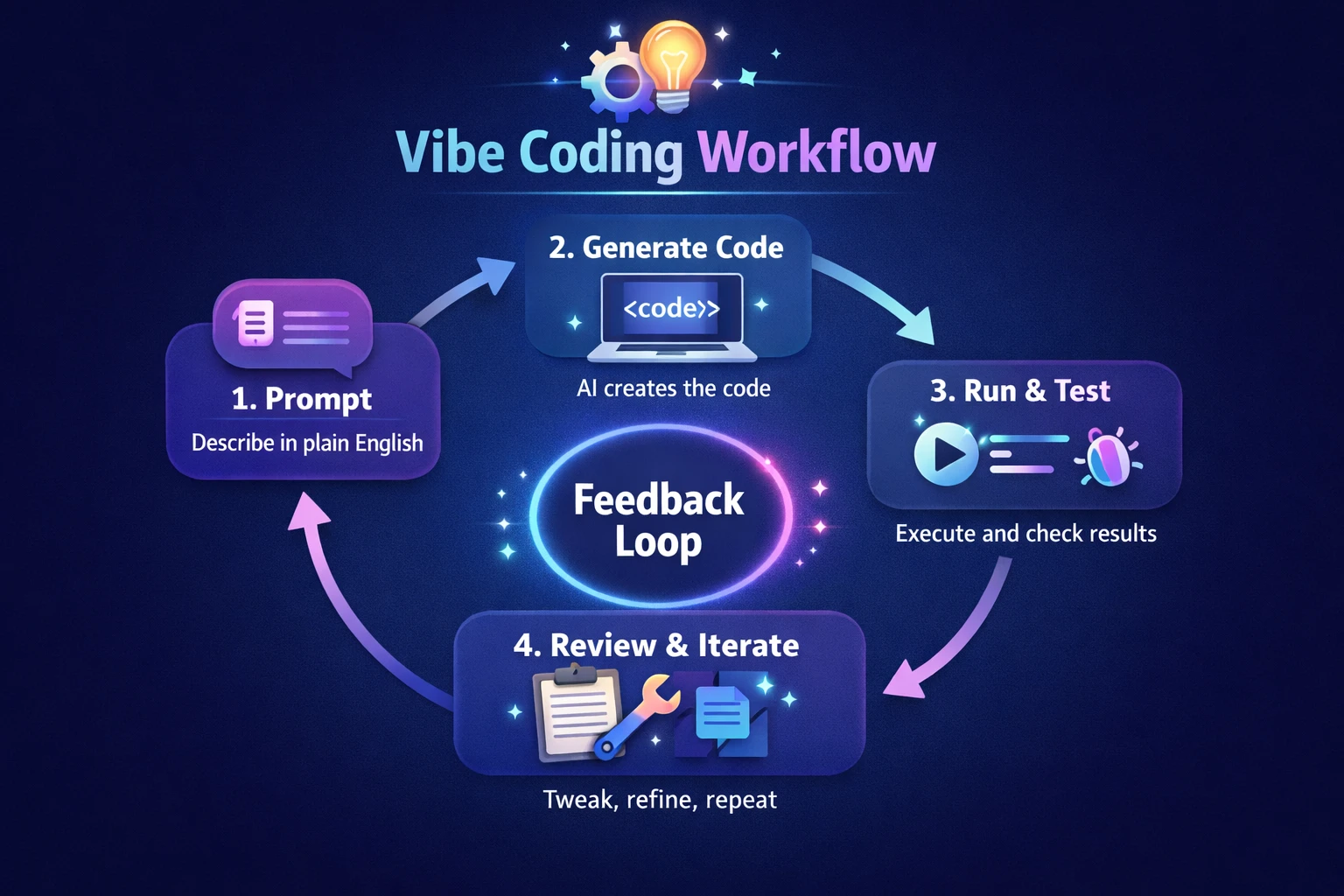
In practice, it usually looks like this:
- Describe the feature in plain English.
- Let the AI generate codes.
- Run it.
- Iterate via prompts until it works “well enough.”
- Refactor, add tests, and harden it if necessary (many teams tend to omit this step).
This style has accelerated as agent-like tools improve. Andrej Karpathy described his workflow as flipping toward “mostly programming in English” with AI tools, while noting that manual skills can start to “atrophy.”
What is Traditional Coding?

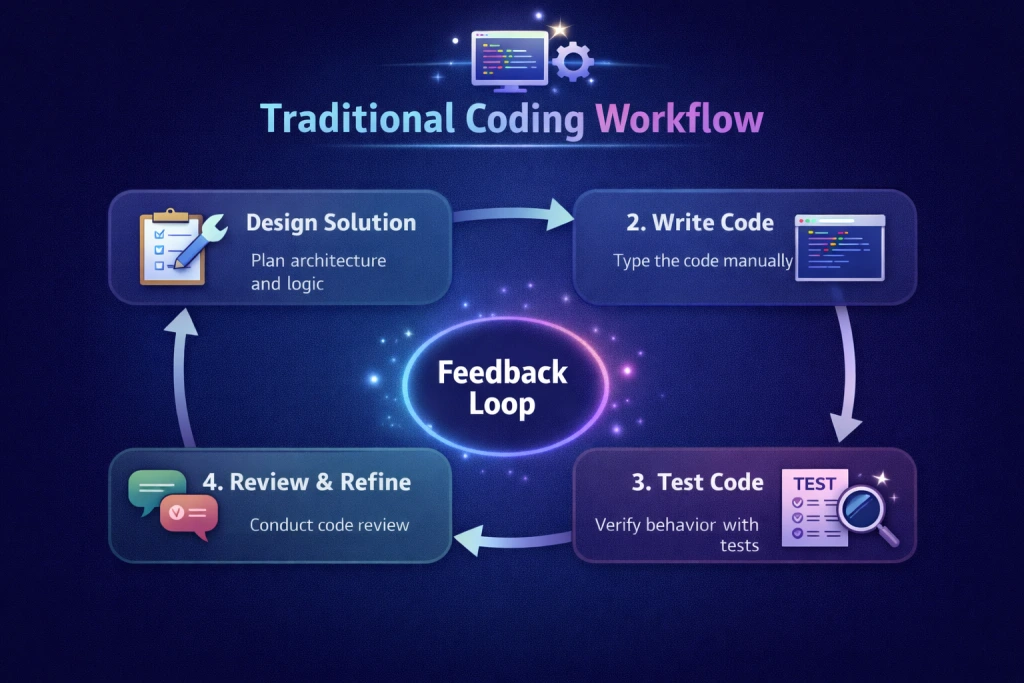
Traditional coding is the conventional engineering approach:
- You decompose the problem.
- You choose an architecture.
- You implement it with a human-written code.
- You validate with tests, code review, static analysis, and production monitoring.
- You maintain and evolve the system over time.
Most professional codebases are not greenfield prototypes. They are living systems. Traditional coding shines in the long game: readability, correctness, security, performance, and maintainability.
Why Are People So Enthusiastic About Vibe Coding?
Vibe coding is getting attention because it changes the “cost of building.” It not only reduces the cost in monetary terms but also in terms of time, momentum, and confidence. For many people, it feels like the first time software creation has become conversational instead of technical.

- It collapses the time from idea to prototype: What used to take days (setup, boilerplate, wiring, UI scaffolding) can often happen in hours. That speed creates a strong emotional payoff: you see progress quickly, so you keep going.
- It lowers the barrier for non-developers: Founders, marketers, designers, and ops people can now build small tools and experiments without waiting for an engineering sprint. That democratization is exciting, even if the results are not always production-ready.
- It gives developers “flow” back: Much coding time involves other tasks. It’s repetitive work: writing boilerplate, searching docs, fixing syntax errors, renaming variables, and moving data around. Vibe coding reduces that friction and keeps people in a flow state longer.
- It feels like a superpower during iteration: Instead of rewriting chunks of code manually, you can say, “make this faster,” “add pagination,” “support dark mode,” or “refactor into reusable components,” and get a working draft immediately. Even if it needs cleanup, the iteration speed is addictive.
- It turns coding into a conversation: The psychological shift is huge. You are no longer fighting the computer. You are explaining what you want. That makes building feel more creative and less mechanical.
- Social proof and the “build in public” effect: People love sharing rapid wins: “I built this product in 30 minutes.” These posts spread fast, which amplifies the hype and pulls more people into trying it.
- It fits the current startup mindset: Startups optimize for speed and learning. Vibe coding helps them validate ideas quickly, which matches the culture of shipping fast and iterating.
The catch
The reason people love vibe coding is also why it can lead to problems: the emphasis on speed can obscure underlying complexity. The excitement is real, but the long-term cost depends on whether you follow up with verification: review, testing, security checks, and maintainability.
The Real Difference: Who Carries the Cognitive Load?
Here’s the cleanest way to think about it:
- Traditional coding: you carry most of the cognitive load up front (design, correctness, edge cases).
- Vibe coding: you shift more cognitive load into iteration (prompt, run, patch, repeat) and into verification (review, tests, security).
If verification is weak, vibe coding can ship “unknown behavior” that looks fine today and becomes expensive tomorrow.
Side-by-side Comparison
Speed to first working version
- Vibe coding: Extremely rapid for prototypes, UI scaffolds, glue code, and “I need something that works now.”
- Traditional coding: Slower at first, faster later when you need stability and predictable evolution.
Many teams are using AI for the first 80 percent. The question is whether they invest in the final 20 percent that makes software durable.
Correctness and edge cases
- Vibe coding: Often gets the optimal path quickly, but edge cases can be inconsistent, especially when you iterate many times and patch symptoms.
- Traditional coding: More reliable when you reason from constraints and write targeted tests early.
Code quality and maintainability
- Vibe coding: Risk of unnecessary complexity, inconsistent patterns, dead code, and “it works, but nobody understands it.” Even pro-AI engineers call out these failure modes.
- Traditional coding: More consistent style and architecture when teams follow standards and enforce review.
Security
- Vibe coding: The biggest landmine. Repeated iterative prompting can degrade security over time, with vulnerabilities creeping in as changes stack up.
There are also emerging benchmarks and papers warning that agent-generated code can be especially risky without guardrails. - Traditional coding: Not automatically secure, but security practices are more established: threat modeling, careful input handling, dependency review, and systematic testing.
Collaboration and ownership
- Vibe coding: If one person is “talking to the model,” teammates can struggle to review or reproduce decisions unless everything is documented and tested.
- Traditional coding: Better suited to shared ownership through conventions, patterns, and established review norms.
Learning and skill development
- Vibe coding: Great for accelerating beginners and unblocking pros, but can encourage shallow understanding if you never read what you ship. Skill atrophy is a real concern even among top engineers.
- Traditional coding: Slower, but builds durable mental models.
Cost
- Vibe coding: Low cost to start, potentially high cost later if quality and security are not enforced.
- Traditional coding: Higher upfront cost, often lower total cost of ownership for long-lived systems.
Comparison Table: Vibe Coding vs. Traditional Coding
| Key Point | Vibe Coding | Traditional Coding |
|---|---|---|
| Method | You describe the intent in natural language, AI generates code, and you iterate by prompting and testing until it works. | You design the solution, write code manually, and validate it through structured review and testing. |
| Speed | Very fast to get a first working version, especially for prototypes, UI scaffolds, and boilerplate. | Slower upfront, but often faster long-term for stable systems because changes stay predictable. |
| Understanding | It can be low if you accept code without reading and reasoning about it. Understanding depends on your review discipline. | Usually, the quality is higher because you build the solution step by step and understand the logic and trade-offs. |
| Usefulness | Best for MVPs, experiments, internal tools, quick automation, and “drafting” code that you will refine later. | Best for production systems, complex logic, security-critical features, and long-lived codebases. |
| Risk | Higher risk if verification is weak (security gaps, inconsistent patterns, hidden edge cases, tech debt). | Lower risk when paired with good practices (tests, reviews, standards), but still depends on team discipline. |
| Best Fit | Prototypes, MVPs, internal tools, UI scaffolding, and quick iterations are great fits for Vibe Coding, especially when failure is low-cost and learning is the goal. | Payments/auth/permissions, sensitive user data, large team codebases, performance-critical systems, and anything meant to last years. |
Where Vibe Coding is a Great Fit
Vibe coding is strongest when the goal is exploration and speed:
- Prototypes and MVPs
- Internal tools
- One-off scripts and automations
- UI scaffolding and layout generation
- Documentation, examples, boilerplate
- “Glue code” between APIs and services
This aligns with the advice from experienced practitioners like Simon Willison: vibe coding can be fine for experiments and low-stakes projects, but pushing that workflow straight into production is a disastrous idea because most engineering work is evolving existing systems.
Also, adoption is real. Even Y Combinator has highlighted how heavily some startups rely on AI-generated codes.
Where Traditional Coding Still Wins
Traditional coding dominates when failure is expensive:
- Payments, authentication, permissions, user data
- Security-sensitive systems
- Performance-critical systems
- Large collaborative codebases
- Products expected to live for years
- Compliance-heavy environments
If you cannot afford “unknown behavior,” you want deliberate architecture, strong tests, and review. If you cannot afford “unknown behavior,” you want deliberate architecture, strong tests, and review. For complex, long-term projects, working with a reliable software development company helps bring structured architecture, testing, security practices, and ongoing maintenance into the development process from the start.
The Best Answer for Most Teams: A Hybrid Workflow
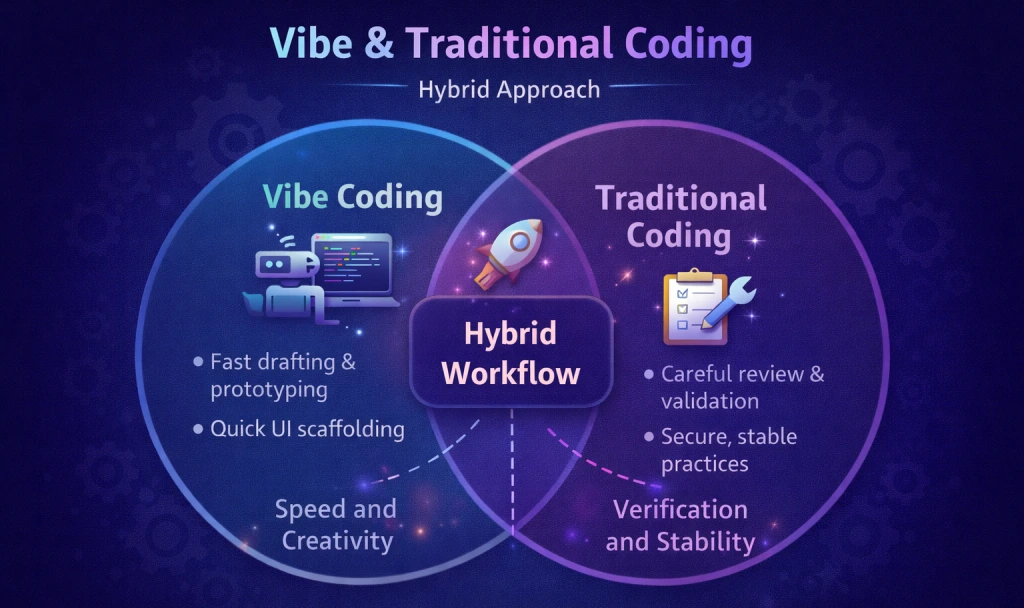
The smartest teams are not choosing a side. They are combining both:
- Use vibe coding to draft and accelerate.
- Use traditional engineering to verify and harden.
Think of it like this:
Vibe coding generates options. Traditional coding selects the safest option and makes it maintainable.
A practical hybrid workflow (repeatable)
Write a tight spec (5 to 10 lines).
- What the feature does
- Inputs and outputs
- Constraints (security, performance, compatibility)
- Non-goals
Generate a first draft with AI.
- Ask for code plus tests
- Ask for a short explanation of trade-offs
Enforce guardrails
- Linting and formatting
- Static analysis
- Dependency checks
- Type checks where applicable
Add tests before shipping
- Happy path
- Permission/role checks
- Failure modes
- Boundary conditions
- For teams building a more structured verification process, a QA testing tools list can help compare options for regression, functional, cross-browser, and automated testing before deciding which tools fit the development workflow.
Human review on critical paths
- Auth, payments, uploads, data access
- Anything that touches user input or external requests
Small commits
- Keep diffs minimal so issues are visible and reversible
Can Vibe Coding Replace Real Coding?
In most real-world scenarios, vibe coding will not fully replace real coding, but it will change what “real coding” looks like.
Vibe coding is excellent at getting you from zero to “something working.” It can generate boilerplate, scaffold features, and unblock you fast. But software is not only about making it run once. Production systems need clarity, correctness, security, performance, observability, and long-term maintenance.
Here’s what still requires real coding skills:
- Architecture decisions: AI can suggest patterns, but you need to choose what fits your product and constraints.
- Edge cases and correctness: AI often nails the happy path, but real systems live in edge cases.
- Debugging and root-cause thinking: When things break in production, you need diagnosis, not more guesses.
- Security and data safety: Authorization, input handling, dependency risks, and secrets management are not “vibes.”
- Maintainability: Someone must own the codebase. That ownership requires understanding.
So the better framing is this:
Vibe coding can replace a chunk of typing, but it cannot replace engineering responsibility.
If you understand what you ship, you are slower. You are just moving the cost into the future. In the right context, it can still extend your engineering team by accelerating prototyping and reducing repetitive implementation work.
Should You Avoid Vibe Coding?
You should not avoid vibe coding. You should avoid unverified vibe coding.
Vibe coding is a powerful tool when the stakes are low or when you apply strong guardrails. It becomes risky when you use it for high-stakes code paths and treat “it works on my machine” as success.
Avoid vibe coding when:
- You are building auth, payments, permissions, or file uploads, or handling sensitive user data
- The system is compliance-heavy or security-critical
- You cannot afford regressions, and you lack tests or review bandwidth
- The codebase is large, and changes must be consistent across many modules
Use vibe coding confidently when:
- You are prototyping, exploring, or building an MVP
- You are generating UI scaffolds, glue code, small utilities, or documentation
- You will enforce guardrails like
- small diffs
- mandatory code review on critical paths
- tests (or at least a written test checklist)
- linting and static checks
- security checks (authorization, sanitization, dependencies)
A simple rule that keeps teams safe:
Vibe coding must adhere to traditional verification if it involves users, money, or permission.
A Quick Example: Vibe Coding Safely in WordPress Plugin Development
If you build on WordPress, vibe coding can save hours, but you need non-negotiables. Your guardrails might include:
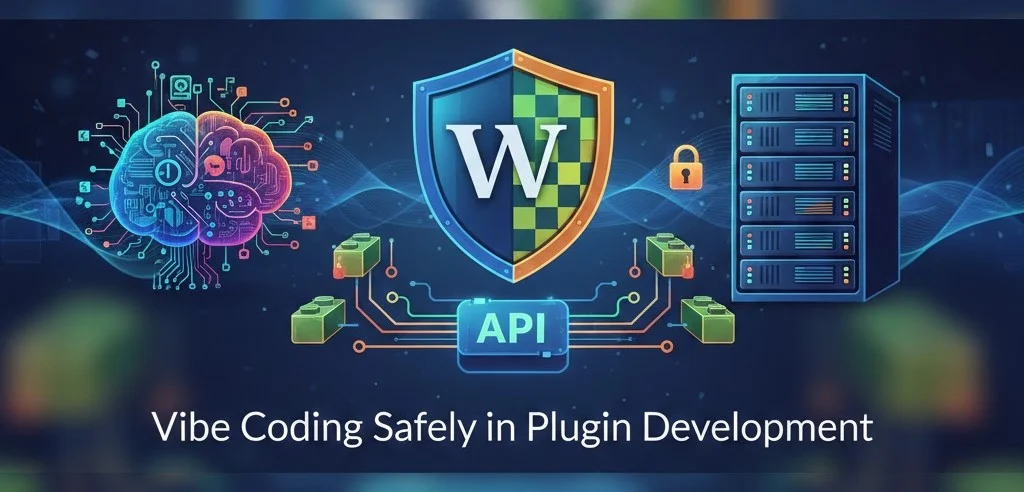
- Nonce + capability checks for every admin action and AJAX/REST route
- Sanitize all input, escape all output
- Prepared statements for DB queries
- Strict allowlists for remote requests, with timeouts
- Compatibility checks for PHP and WP versions
- Minimal diffs and manual review for permission and data flows
This makes vibe coding a productivity multiplier instead of a vulnerability generator.
How GS Plugins Can Help You Ship Faster (Without the Chaos)
Vibe coding is great for speed, but speed alone is not the goal. The real goal is shipping something that still works next month, stays easy to update, and does not break when WordPress or your theme changes.
That’s where GS Plugins fits naturally into the conversation.
When you use reliable, well-structured WordPress plugins, you reduce the amount of custom code you need to generate, debug, and maintain. Instead of vibe-coding the same UI patterns again and again, you can rely on battle-tested features and focus your coding effort on what is truly unique to your project.
Here’s how GS Plugins supports a “hybrid workflow” (vibe for velocity, verify for value):
- Less custom code, fewer failure points: Need sliders, grids, team showcases, testimonials, logos, galleries, or filters? Using a proven plugin reduces the risk of shipping “unknown behavior” and avoids reinventing common components.
- Faster builds for client work: If you build client websites, your biggest bottleneck is often repetition. GS Plugins helps you move faster because many layouts and display needs are already solved, so you spend less time writing and rewriting code.
- Cleaner updates and lower maintenance cost: AI-generated code can be hard to maintain if it is inconsistent. Using stable plugins for common features keeps your stack predictable and reduces surprise breakages during updates.
- Better performance and UX with fewer hacks: Instead of layering quick fixes, you can rely on optimized components and consistent styling options. That means fewer last-minute patches and a smoother user experience.
- Ideal for WordPress teams who want speed with stability: Whether you prefer vibe coding, traditional coding, or a hybrid approach, the goal is the same: ship faster while keeping your site stable. Plugins that are designed for real-world WordPress usage help you get there.
Bottom line: Use vibe coding for experimentation and custom logic, but let proven plugins handle the repeatable building blocks. That combination keeps development fast, safe, and maintainable.
5 FAQs About Vibe Coding
What is vibe coding, in simple terms?
Vibe coding is a workflow where you describe what you want in plain language and an AI generates the code. You then run it, adjust the prompt, and iterate until it works. It is less about typing codes and more about guiding, testing, and refining.
Is vibe coding only for beginners?
No. Beginners use it to get started faster, but experienced developers use vibe coding to speed up scaffolding, reduce repetitive work, and prototype quickly. The key difference is that experienced devs usually add guardrails like reviews, tests, and security checks.
Can vibe coding replace traditional coding?
Not fully. Vibe coding can replace a lot of manual typing and boilerplate, but it does not replace engineering judgment. Architecture decisions, edge cases, debugging, security, and long-term maintenance still require real coding skills and responsibility.
Is vibe coding safe for production?
It can be, but only with verification. If you ship AI-generated code without review and testing, the risk goes up fast. For production, you should enforce small diffs, code review on critical paths, tests, and basic security hygiene (authorization, input handling, and dependency checks).
What is the best way to use vibe coding without creating tech debt?
Use it as a draft generator, then switch into “verification mode.” Write a tight spec, generate the first version, and then validate with linting, tests, and human review. If it touches users, money, or permissions, treat verification as non-negotiable.
Conclusion
Vibe coding is not the end of traditional coding. It is a faster path to a first draft. Traditional coding is still what makes software reliable, secure, and maintainable over time.
If your goal is speed, vibe coding can help you move from idea to working prototype quickly. But if your goal is a product that survives real users, real edge cases, and real updates, you still need the fundamentals: clear architecture, careful review, testing, and security discipline.
The smartest approach in 2026 is not choosing one side. It is using both. Let vibe coding accelerate experimentation and reduce repetitive work, then rely on traditional coding practices to verify, harden, and own what you ship. In short: vibe for velocity, verify for value.
Popular plugins
Plugins people love
Easy, well-supported plugins used on more than 55,000 sites.
 GS Logo SliderClient & partner logos
 Solid TestimonialsCustomer reviews & ratings
 GS Team MembersTeam profiles & bios
 GS Filterable PortfolioFilterable work galleries
 GS Projects ShowcaseProjects with details

Sarwar Zaman
Hi, I'm Sarwar Zaman, founder of GS Plugins, creating tools that make WordPress effortless and powerful. When I’m not diving into code, I’m a dad who loves spending quality time with my family. Besides traveling and reading novels, writing blogs is the way I connect with people, sharing tips and stories to make the web a better place.
More articles by Sarwar Zaman