On this page3 sections
WordPress is a powerful and flexible platform; it powers over 40% of the web. But it’s not always the right choice for every project. Just like a tool is only as effective as the task, recommending WordPress depends on the client’s needs, technical expertise, and long-term goals.
In this post, we will discuss situations in which you might choose not to recommend WordPress to a client and the reasons behind that decision.
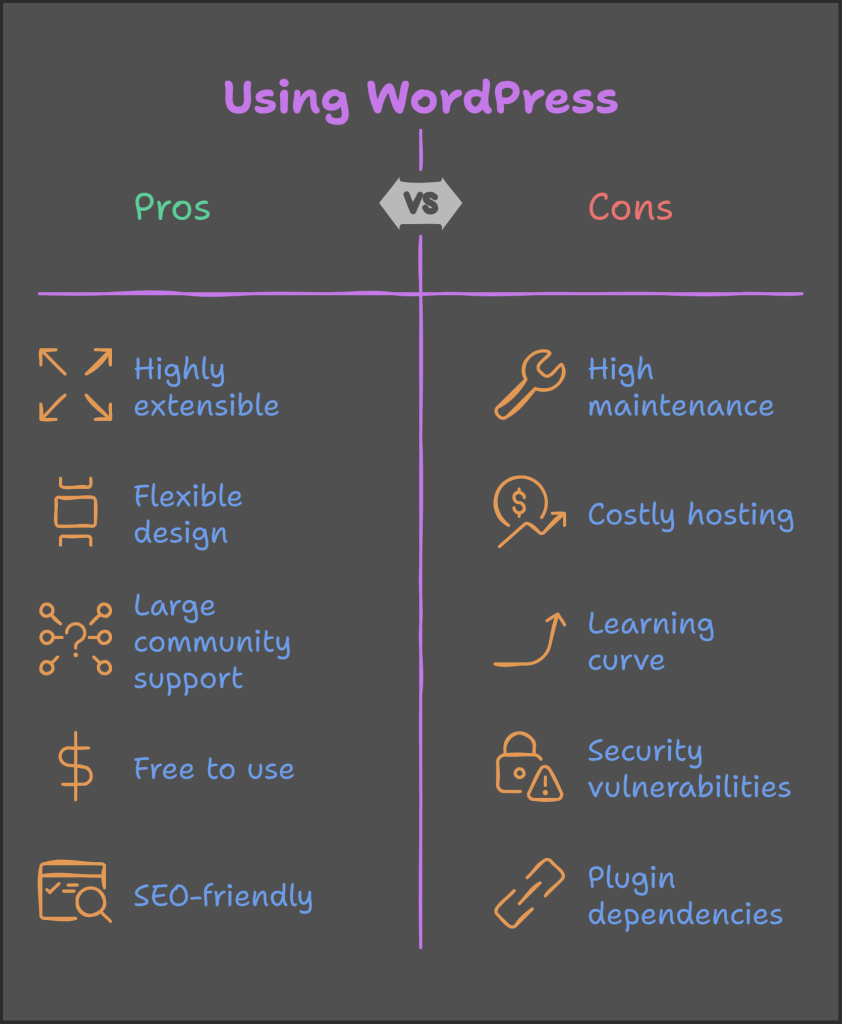
When should I not recommend WordPress?
1. When Simplicity is Key for Small Projects
- While WordPress is flexible, it comes with complexity. A more straightforward solution, like Wix, Squarespace, or Card, may be more suitable for small projects like single-page websites, portfolio sites, or temporary campaigns. These platforms offer drag-and-drop builders and all-in-one packages with no need for setup, plugins, or maintenance.
2. Don’t recommend WordPress when Budget is Extremely Tight
WordPress itself is free, but building and maintaining a WordPress website costs
- Hosting: Premium plans for reliable hosting providers can cost $10–$30/month.
- Themes & Plugins: Premium themes and plugins have annual fees.
- Maintenance: Security updates and backups require additional services.
If a client can’t afford these recurring costs, platforms with free plans (like Weebly) or low-cost all-in-one solutions may be better.
3. When E-commerce is the Only Focus
While WordPress can do e-commerce with plugins like WooCommerce, it’s not purpose-built for this. Dedicated e-commerce platforms like Shopify or BigCommerce may be more suitable for clients solely focused on online selling. They offer:
- Built-in e-commerce features (inventory management, payment gateways).
- Dedicated support for store owners.
- No plugin dependencies.
4. When high performance is inevitable
For high-traffic sites (millions of visitors) or those that require super-fast speed, WordPress may not be the best unless paired with top-tier hosting and optimization. Webflow or custom-coded solutions built on frameworks like React or Django can outperform WordPress in these cases.
5. Don’t recommend WordPress when deadlines are not negotiable
WordPress requires setup time:
- Choosing and configuring themes.
- Customizing design and functionality.
- Installing and optimizing plugins.
If a client needs a website in a few hours or days, website builders like Wix or GoDaddy Website Builder can deploy faster.
6. When the client has no technical expertise
WordPress has a learning curve. Clients with no technical knowledge will struggle with
- Plugin updates and conflicts.
- Backups and security.
- Troubleshooting.
For clients who can’t or won’t manage these (and don’t have a webmaster), platforms with built-in support like Squarespace are better.
7. When security is the top priority
WordPress is a target for hackers because of its popularity. To keep a WordPress site secure requires
- Regular updates to core software, plugins, and themes.
- Security plugins.
- SSL and firewalls.
Organizations with high-security requirements, like banks or government bodies, may benefit from custom-built systems with more control over security.
8. Don’t Recommend WordPress when custom-built features are required
- WordPress is highly extensible but relies on plugins or custom coding for advanced features. For clients who need unique functionality (e.g., a complex booking system or custom CRM), a custom-built solution from scratch may be more suitable.
9. When compliance and accessibility are required
- Meeting compliance standards like GDPR or ADA Accessibility can be tricky on WordPress without heavy customization. Platforms with built-in compliance tools may be more suitable for industries like healthcare or finance.
10. Don’t recommend WordPress when stability is non-negotiable
- Clients who can’t tolerate downtime or plugin conflicts may find WordPress too risky. Platforms like Drupal or static site generators (e.g., Gatsby) may be more stable.
FAQs
When should I not recommend WordPress to a client?
WordPress may not be ideal for projects with tight budgets, no maintenance resources, or high-performance demands.
What are better alternatives to WordPress for e-commerce sites?
Shopify and BigCommerce are tailored for e-commerce and offer seamless features without extensive plugins.
Why might WordPress not suit small businesses?
Small businesses needing simple websites with minimal features might prefer Wix or Squarespace for ease of use.
Is WordPress secure enough for high-risk industries?
WordPress can be secure but requires proactive updates and monitoring. Custom-built solutions might be safer for high-risk sectors.
Can WordPress handle complex, unique functionalities?
While WordPress is flexible, a custom-coded platform may better suit projects with unique, complex requirements
Conclusion
WordPress is a powerful and flexible platform, but it’s not a one-size-fits-all solution. Understanding the client’s goals, budget, and technical expertise is key to determining the best fit. By evaluating each project’s unique needs, you can ensure your clients have the right tools for success, whether that’s WordPress or not.
Popular plugins
Plugins people love
Easy, well-supported plugins used on more than 55,000 sites.
 GS Logo SliderClient & partner logos
 Solid TestimonialsCustomer reviews & ratings
 GS Team MembersTeam profiles & bios
 GS Filterable PortfolioFilterable work galleries
 GS Projects ShowcaseProjects with details

Sarwar Zaman
Hi, I'm Sarwar Zaman, founder of GS Plugins, creating tools that make WordPress effortless and powerful. When I’m not diving into code, I’m a dad who loves spending quality time with my family. Besides traveling and reading novels, writing blogs is the way I connect with people, sharing tips and stories to make the web a better place.
More articles by Sarwar Zaman